Kickresume alternative no subscription
Kickresume alternatives that do not require a subscription
Kickresume has a real free tier, but the AI writer, the ATS checker and most templates sit behind an auto-renewing subscription. Here are the alternatives that do not require one, sorted by how you pay, with real prices and where your data ends up.
Most people do not go looking for a Kickresume alternative because Kickresume is bad. It is a polished tool with a genuinely useful free tier. They go looking because the part they actually wanted, the AI that drafts and tailors the resume, the cover letter writer, the ATS checker and the good templates, all sit behind a subscription that renews on its own until you remember to stop it.
If that is why you are here, this is a comparison and not a takedown. Kickresume does several things well. What it does not do is let you keep the AI features without a recurring charge, or keep your resume off its servers. This article lays out the alternatives that do not require a subscription, sorted by how you pay, with the real prices and the honest tradeoffs of each. The one thing worth saying up front: "no subscription" and "private" are two different promises, and only some of these options make both.
What actually sits behind Kickresume's subscription
Kickresume's free plan is real, and that matters. You can create a resume and export it without paying. But the plan caps how much you can add, and it locks the features most people came for.
The AI Resume Writer and the AI Cover Letter Writer, both running on GPT-4.1, are premium only. So is the ATS Resume Checker, the LinkedIn and PDF import, the Career Map, and the mobile app. On templates the gap is wide: the free tier gives you a handful, while the paid plans unlock more than forty (Kickresume pricing). In practice, a free Kickresume resume is a basic resume built by hand. The moment you want the writing help, you are paying.
The prices, as published in mid-2026 and shown here in euros, come in three shapes: about 24 euros a month billed monthly, about 18 euros a month billed quarterly (roughly 54 euros a quarter), or about 8 euros a month billed yearly (roughly 96 euros for the year). All three renew automatically, with a 14 day money-back guarantee. Kickresume prices in your local currency, and a limited-time 20 percent discount was running when this was written, so check the current figure before you decide.
Held on the monthly plan, that is around 288 euros a year. The yearly plan is the cheapest way in at 96 euros, but it still renews, and a renewal you forgot about is the reason the term "no subscription" gets typed into a search box in the first place.
What "no subscription" can actually mean
"No subscription" is not one thing. There are three real routes to it, and they suit different people.
The first is a genuinely free tool. You pay nothing and there is nothing to cancel. The catch is usually one of two things: the good features are gated, like Kickresume's own free tier, or the tool is free because your data pays for it in some other way. Free is only a clean deal when you have read what happens to your resume.
The second is a one-time or lifetime payment. You pay once and keep what you bought. This removes the recurring charge entirely. It does not, on its own, tell you where your resume lives. Plenty of tools that charge once are still cloud web apps storing your document on their servers.
The third is a free and open-source tool you run yourself. It costs nothing, has no account, and keeps your data on your own machine or server. The tradeoff is that you do more of the setup, and the polish varies. This route is the only one that delivers both halves of the promise, no subscription and full privacy, at the same time.
Which route fits depends on what you are optimising for: the lowest price, the least hassle, or the most control over your data. The table below sorts real options by exactly that.
The alternatives, by how you pay
Here is the field laid out by pricing model, with where your data ends up and whether AI writing is included. Prices are as published in mid-2026, in the currencies the tools use. Kickresume Premium sits at the top as the baseline you are comparing against.
| Option | Pricing model | Real price (mid-2026) | Recurring? | Where your resume lives | AI writing |
|---|---|---|---|---|---|
| Kickresume Premium | Subscription | About 8 to 24 EUR/month by billing cycle | Yes, auto-renews | Kickresume's cloud servers | Included |
| Kickresume Free | Free tier | 0 EUR | No | Still Kickresume's cloud | Locked; capped content |
| Reactive Resume | Free, open-source | 0 EUR | No | Your own machine or server | Optional, with your own OpenAI key |
| One-time or lifetime web tool | Pay once | Roughly 10 to 150, once | No | Usually still the provider's cloud | Varies by tool |
| CVumi (local desktop) | One-time payment | 69 EUR once, or 34 EUR with a student email | No | A folder you choose on your computer | Yes, with your own AI key, billed by usage |
Two honest notes on that table. Kickresume's free tier is a legitimate way to get a plain resume out the door for nothing, so if you do not need the AI or the premium templates, it is a real answer to your own question. And Reactive Resume is the standout for people who want free and private at once: it is open-source under the MIT licence, needs no account, and can be self-hosted with Docker so nothing leaves your server. The cost is that you are running the software yourself, which is fine if you are comfortable with that and a wall if you are not.
For the one-time and lifetime paid tools, the prices swing widely because the label covers very different products, and some of them are still cloud apps. We break the pricing models down properly, with named tools and the traps, in one-time payment vs subscription resume builders.
What a subscription really costs over three years
A job search is rarely one month, and most people come back to the same tool for the next move. Three years is a fair horizon. Over that span the shape of each pricing model is the whole story.
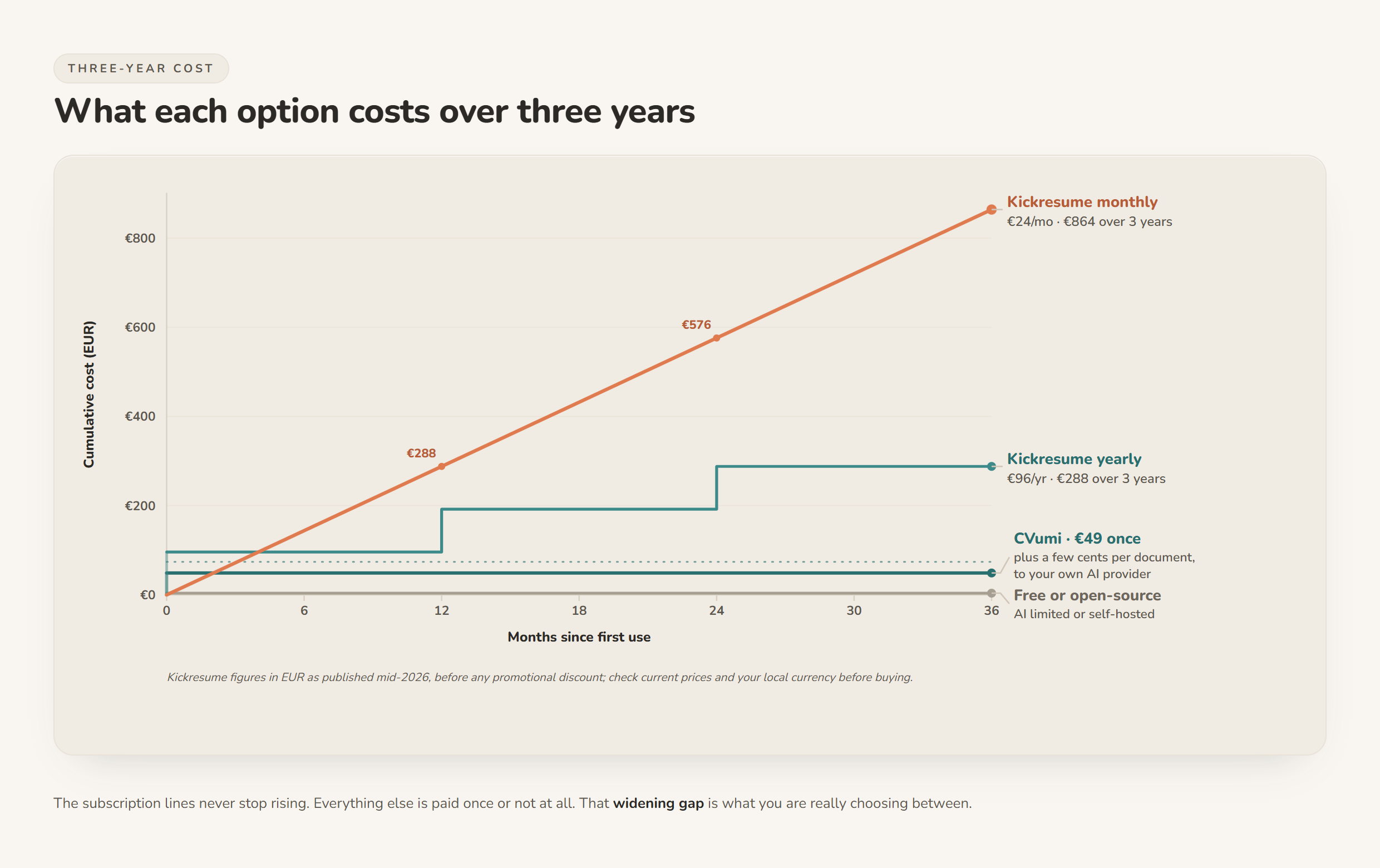
The subscription lines climb for as long as you hold the plan. The yearly plan climbs more slowly than the monthly one, but it still climbs, and it still renews. A one-time local tool is a flat line at the price you paid, plus the few cents per document you pay your own AI provider directly. A free or open-source tool sits on the floor, at the cost of either locked features or your own setup time. None of these is automatically the right answer. The point is to see the slope before you sign up, not after. If paying an AI provider yourself is new to you, bring-your-own-API-key resume tools, explained covers how that works and what it costs.
The cost that is not on the invoice: your data
Every price so far has been in money. The one that appears on no invoice is your data, and it is the reason the pricing model and the privacy model keep overlapping.
Your resume is one of the most revealing documents you own. Full name, home address, phone number, every employer, every date, sometimes a photo or your nationality. Kickresume is a cloud web app, so using it means creating an account, often through a Google, Facebook or LinkedIn login, and storing that document on its servers. Its privacy policy is reasonable and GDPR-aligned, and it states that data is not shared without your consent. It also says user data is retained for up to five years from your last login (Kickresume privacy policy). That is not unusual for a cloud service. It is still a copy of your most sensitive document sitting on a server you do not control, for years after you stop using it.
You do have rights over it. In the EU, the right to erasure under GDPR Article 17 lets you ask a company to delete your personal data, and it is worth using. It also has limits worth knowing: it reaches the copies the company controls, but backups and data already shared can linger, and the law lists cases where it does not apply. Deleting a file after the fact is always weaker than never uploading it. The most private copy of your resume is the one that never left your computer.
This is where the routes split for real. A free tier keeps your data in the cloud. A one-time cloud tool keeps your data in the cloud. Only a self-hosted open-source tool or a local desktop app keeps the document on hardware you control. That is a property of where the files live, not of the price tag, which is why the two questions have to be asked separately. If privacy is the real reason you are leaving Kickresume, the practical method is in how to keep your career documents fully private.
How to choose the alternative that fits
You can settle this in a few minutes if you know what you are optimising for.
- If you only need a basic resume and no AI, stay free. Kickresume's own free tier will export a plain resume at no cost. So will a template in a word processor. There is nothing to cancel, and nothing to compare.
- If you want free and private at once, self-host. Reactive Resume is free, open-source and runs on your own machine or server. Pick this if you are comfortable with a little setup and want your data to stay yours.
- If you want the AI writing help without the recurring charge, pay once. A one-time or lifetime tool removes the subscription. Check whether "one-time" also keeps your data local, because many do not.
- If you want both the AI help and your files on your own machine, choose a local desktop tool. This is the narrow overlap where a single payment and real privacy meet. It is the box CVumi is built for.
One caveat runs under all of this. No tool guarantees an interview. If your applications are not landing, the problem is usually the resume itself and not the software around it, which is a separate and fixable thing. We cover it in why your CV keeps getting rejected, and if the ATS checker was the Kickresume feature you were chasing, how to get past ATS without keyword stuffing shows how to do that work without paying for a scanner.
How CVumi fits
CVumi is the local desktop option in the table above, so here is what it actually does, plainly. It is a desktop app for Windows and macOS with a one-time price: 69 EUR for a standard licence with three device activations, or 34 EUR with a student email. There is no subscription, no auto-renewal, and no per-application credit. You buy it once and keep using it.
Your resume, your master profile and your past applications stay in a folder you choose on your own computer. CVumi runs no server that stores your documents, and the company never sees them. When an AI step runs, the request goes from your machine straight to the AI provider under your own API key, so you pay the provider directly for usage, usually a few cents per document, and nothing is parked on a CVumi server in between.
From one job posting it writes a tailored CV, a matching cover letter and the covering email together, and its fit analysis shows where you genuinely match the role and where the honest gaps are, working only from your real experience. When the application is ready, one click opens your normal email client with the files attached, so you review and send it yourself.
If you want a wider field than one product, we compared several private, one-time tools in the best privacy-friendly AI CV builders in 2026, and put a cloud tracker head to head with a local tool in Teal vs local, private CV tools.
The short version
Kickresume's free tier is real, but the AI writer, the cover letter writer, the ATS checker and the good templates all sit behind an auto-renewing subscription that reaches roughly 96 to 288 euros a year depending on the plan. The alternatives that do not require a subscription come in three shapes: a free tier with the good parts locked, a free open-source tool you host yourself, and a one-time payment. Only self-hosted or local tools also keep your resume off someone else's servers. Weigh the money and the data against your own timeline, because the pricing page only shows you half of it.
If you would rather pay once, keep your career documents on your own machine, and still get the AI help, download CVumi. One payment, your files stay local, and you hold the key.