privacy-friendly AI CV builder
Best privacy-friendly AI CV builders in 2026
A privacy-friendly AI CV builder keeps your career history on your device, not on a stranger's server. Here are the tools that do it well in 2026, plus a checklist to vet any of them.
Your CV is the most concentrated file of personal data you own. Full name, home address, phone number, every employer, every date, sometimes your photo and your date of birth. An AI CV builder wants exactly that file, and most of them want it on their servers. That is a strange trade to make with a company you found through a search result an hour ago.
A privacy-friendly AI CV builder does the useful part, tailoring and sharpening your CV, without keeping a copy of your life to do it. This guide covers what "privacy-friendly" actually means for these tools, which ones earn the label in 2026, and a short checklist so you can vet any builder yourself, including the ones not on this list.
What makes an AI CV builder privacy-friendly
The label gets used loosely, so here is the plain version. A privacy-friendly AI CV builder is one where you can answer these six questions in your favour:
- Where does the file live? On your device or your own server, not a copy sitting in a vendor's database.
- Do you need an account? The fewer accounts holding your career data, the fewer places it can leak.
- Does the AI provider train on what you send? This is separate from the builder. The model behind the tool has its own policy.
- How long is data kept, and can you really delete it? A delete button that leaves backups untouched is not the same as deletion.
- Is anything shared or sold? Read the terms for "partners", "affiliates", and "service improvement".
- Is the cost honest? Free tools that gate the PDF or harvest data are not free. You pay with the file.
Notice that most of these are about storage and control, not features. A tool can have great AI and still be a privacy problem if the answer to "where does the file live" is "our cloud".
What actually happens to your CV in a typical cloud builder
When you upload a CV to a hosted builder, it keeps a copy. That is the product, not a side effect. Your file is stored, backed up, and depending on the terms you agreed to, it may be used to improve the service or shown to partners.
The AI layer adds a second question. Some builders send your text to a model provider that reserves the right to use inputs to improve its own models, unless the terms say otherwise. So your data can sit in two places: the builder's database and the model provider's pipeline. Neither is under your control once the file leaves your machine.
In the EU there is a real safety net, and it is worth using. The right to erasure, GDPR Article 17, lets you ask a company to delete your personal data. It also has limits people miss. A deletion request reaches the copies a company controls, but backups and data already shared can linger, and the law lists cases where the right does not apply at all. Asking for deletion after the fact is weaker than never sending the file. The safest copy of your CV is the one that never left your device. For the method behind that, see how to tailor a CV to a job description without uploading it to the cloud.
The best privacy-friendly AI CV builders in 2026
There is no single winner, because "private" means different things depending on how you work. Below are the models that hold up, with the tools that do each one well. The table compares them on the questions that matter, not on template counts.
| Tool or model | Where your data lives | Account needed | AI model | Does the provider train on your inputs? | Cost |
|---|---|---|---|---|---|
| CVumi (local desktop app) | A folder you pick on your Windows or macOS machine | No account to use it; email only at purchase | Bring your own API key | No, not by default on the providers’ APIs | One-time, 69 EUR (34 EUR student) |
| Reactive Resume (self-hosted) | Your own server or machine, via Docker | Yes, on your own instance | Bring your own key: OpenAI, Gemini or Anthropic | Depends on the provider and key you choose | Free, open source (MIT) |
| OpenResume (browser-local) | In your browser, on your device | No | Light: mostly manual editing plus ATS checks | Not applicable | Free, open source |
| Typical cloud AI resume builder | The provider's servers | Yes | Vendor-managed, shared model | Read the policy; some reserve the right | Usually a monthly subscription |
CVumi: a local desktop app with your own key
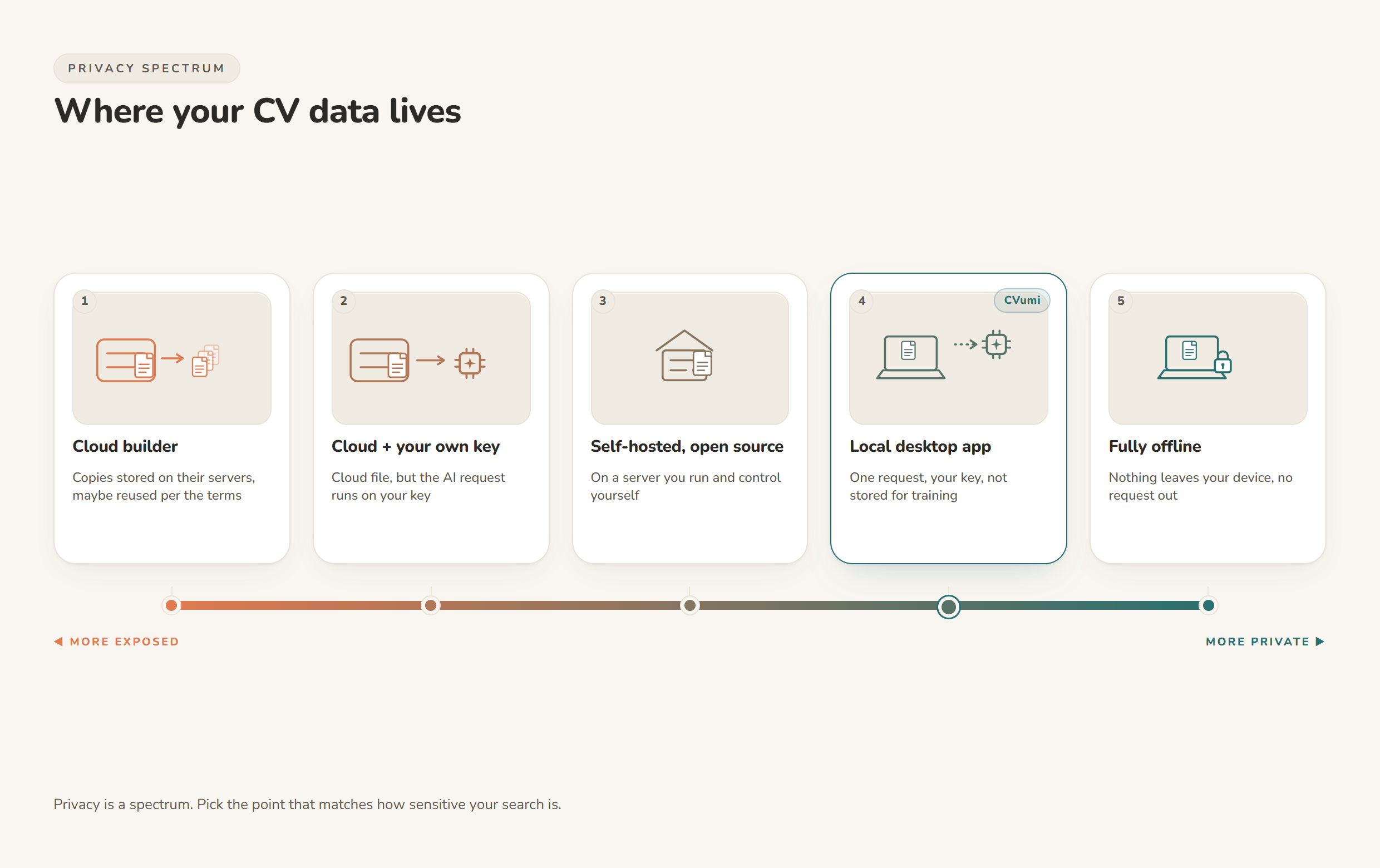
CVumi runs on your own computer rather than in a browser tab pointed at someone else's server. Your CV, your master profile and your past applications sit in a folder you choose on your machine. There is no CVumi server holding your documents, and the company never sees them. When an AI step runs, the request goes straight from your computer to your chosen AI provider under your own API key, so your text is not routed through a CVumi database that keeps a copy.
It is built for people who want the tailoring done for them without giving up the file. It writes a tailored CV, a matching cover letter and a covering email together, and its fit analysis shows where you genuinely match a role and where the real gaps are, using only your actual experience. It does not invent achievements to fill a blank.
Reactive Resume: open source and self-hosted
If you are comfortable running your own software, Reactive Resume is the strongest fully open-source option. It is MIT licensed, self-hostable with Docker, and describes itself as built with privacy as a core principle, with no tracking by default and one-click data export. Its AI features use a bring-your-own-key model, so you plug in a key from OpenAI, Google Gemini or Anthropic and the tool talks to that provider directly. Self-host it and your resume data stays on hardware you control. The tradeoff is setup: someone has to run and maintain the instance.
OpenResume: browser-local, no account
OpenResume takes a different route to the same goal. It is open source, needs no sign-up, and stores everything in your browser on your own device, so the data does not leave your machine. It is lighter on generative AI, leaning on manual editing and ATS checks rather than writing text for you. If you want zero AI and zero account, and you are happy to do the wording yourself, this is a clean, honest choice.
Why bring-your-own-key changes the privacy math
Two of the tools above share a pattern worth understanding, because it is the difference between "trust us" and "check for yourself". With bring-your-own-key, or BYOK, the builder does not run the AI. You supply an API key from a model provider, and your text goes to that provider under your own account. The builder becomes a thin layer that never has to store your CV to make the AI work.
That only helps if the provider itself does not learn from your inputs. This is where the provider's own policy matters more than the builder's marketing. Anthropic, the provider CVumi and Reactive Resume can both use, states it plainly for its API: "By default, we will not use your inputs or outputs from our commercial products (e.g. Claude for Work, Anthropic API, Claude Gov, etc.) to train our models" (Anthropic, model training policy). Consumer chat plans are governed by a different policy, so the API route is the relevant one here.
Put the two together and you get a clean chain: the file stays on your machine, one request goes out under your key, and the provider does not fold that request into its training set. No builder database in the middle, and nothing sitting in a model pipeline afterwards.
How to vet any AI CV builder in five minutes
You do not need this list to make a good decision. You need the questions. Open any builder's privacy policy and terms, use the search box, and check for these:
- "Store" and "retain". Find how long they keep uploads, and whether deletion clears backups. Look for a specific number of days, not a vague promise.
- "Train", "improve our models", "machine learning". If your content can feed a model, it should say so. Silence is not a no.
- "Third parties", "partners", "affiliates". See who else gets the data and why.
- "Sell" and "share". In some regions "share" has a legal meaning close to "sell". Read both.
- Account and deletion. Can you use the tool without an account, and can you delete everything from inside the product rather than by emailing support?
- The AI provider's own policy. For BYOK tools, read the model provider's terms, not just the builder's.
- The price of "free". If a free tool never explains how it makes money, assume the data is part of the answer.
If a policy is hard to find or written to be unreadable, treat that as an answer in itself. For a deeper walk-through of locking down your whole application, see how to keep your career documents fully private.
The honest tradeoffs
Privacy-friendly tools ask something of you in return, and it is fair to name it.
Self-hosted software like Reactive Resume needs setting up and keeping running. Browser-local tools like OpenResume keep everything on your device but do less of the writing, so you bring more of the words yourself. Local desktop apps ask you to manage your own files and, for the AI steps, to bring your own key and your own connection. None of these do the one thing a cloud builder does automatically, which is sync your CV to every device without you thinking about it. That convenience is exactly what puts a copy on someone else's server.
For most job seekers that is a small price. You tailor a few applications a week, from one or two machines, and keeping the original where it belongs is worth a little more hands-on control.
Where CVumi fits
CVumi is the option for people who want the AI to do the heavy lifting and still want the file to stay theirs. Paste or find a job, and it produces a tailored CV, a matching cover letter and a covering email in one pass. You can highlight any section and ask it to refine that part alone, leaving the rest untouched. It handles several formats, including the German Lebenslauf, and generates applications in seven languages: English, German, French, Spanish, Polish, Italian and Portuguese.
When the application is ready, one click opens your normal email client with the CV and cover letter already attached, so you review and send it yourself. Nothing is sent on your behalf.
On cost, CVumi is a one-time payment: 69 EUR for the standard licence with three device activations, or 34 EUR with a student email. No subscription, and no per-application credits. If you are weighing that against a monthly tool, see one-time payment vs subscription resume builders. To pass the human read as well as the software, pair any of this with how to customise a CV for ATS without keyword stuffing.
One honest limit, the same one every tool on this page shares. A privacy-friendly builder protects your data. It does not guarantee an interview or a job. It tailors and sharpens what is already true about you, and the rest is still your search to run.
The short version
If you want AI tailoring without handing over your history, you have real choices in 2026. Self-host Reactive Resume if you like running your own software. Use OpenResume if you want a free, browser-local builder and are happy to write the words yourself. Use CVumi if you want a desktop app that does the tailoring for you, keeps your files in a folder you control, and runs the AI under your own key.
Whichever you pick, run the checklist first. Your CV is worth reading the policy for.
Ready to keep the file yours? Download CVumi. One payment, your documents stay local, and you keep the key.