ATS friendly CV without keyword stuffing
How to customise a CV for ATS without keyword stuffing
Screening software is real, but stuffing your CV with keywords fails the human read. Here is how to use the employer's own words honestly and pass both gates.
You have probably read that a robot rejects most CVs before a human sees them, and that the cure is to pack the page with the right keywords. One half of that is true. Screening software is real, and almost every large employer uses it. The other half is bad advice. Stuffing a CV with keywords is one of the quickest ways to fail the step that actually decides, which is a person reading the shortlist.
This guide shows how to make an ATS-friendly CV without keyword stuffing. You will see how the software really works, why cramming in terms backfires, and a repeatable way to use the employer's own words where they are genuinely true of you. The method works in any text editor. At the end I show how CVumi does the same steps on your own computer.
What an ATS actually does with your CV
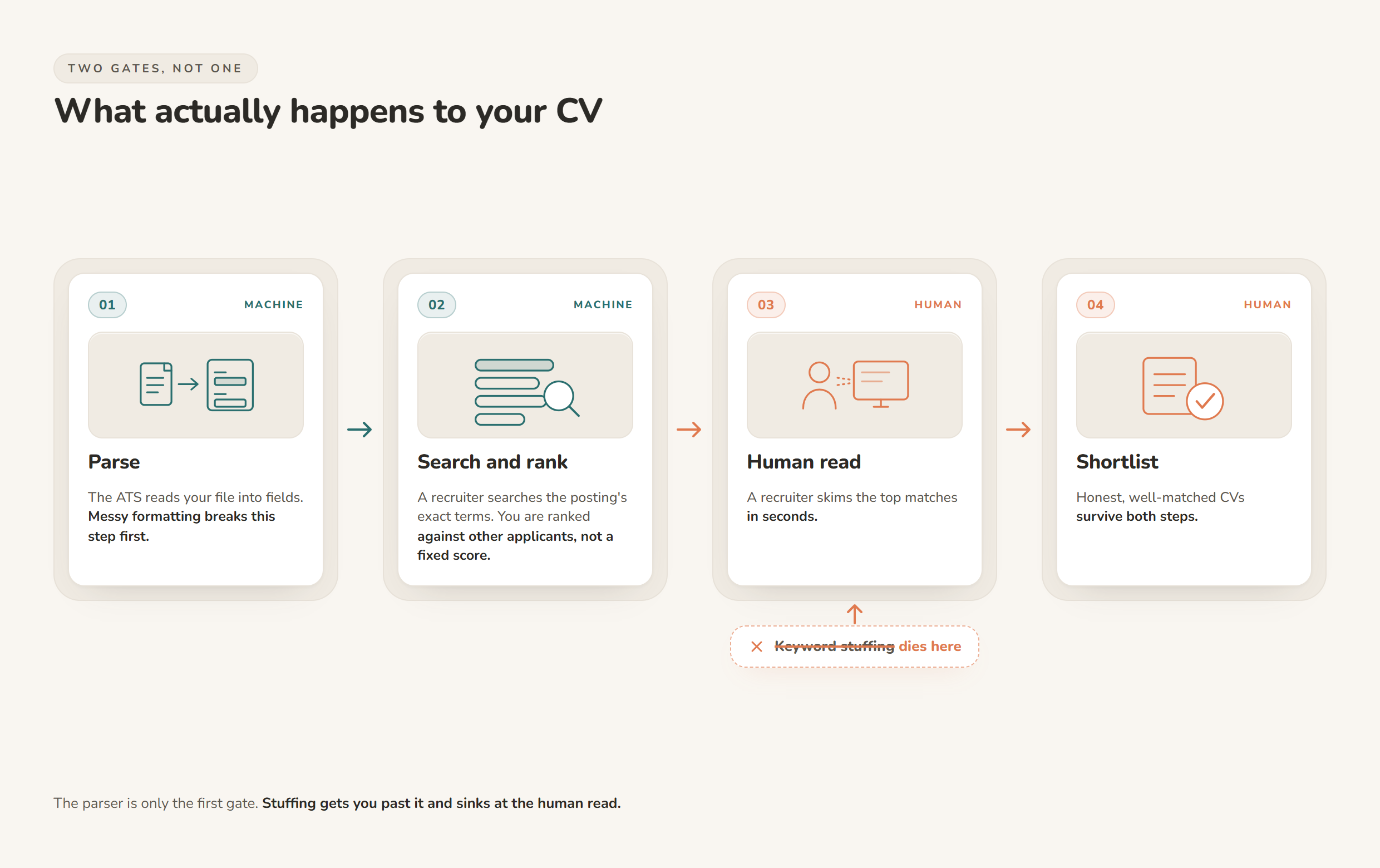
An applicant tracking system is mostly a database with a search box. When you apply, it reads your file into structured fields such as contact details, work history, skills and dates, stores the result, and lets a recruiter search and sort the pile. About 99 percent of Fortune 500 companies use one to screen applicants, a figure from Harvard Business School and Accenture's Hidden Workers study as reported by the Harvard Gazette.
Two myths are worth clearing up. First, most systems do not quietly bin three quarters of applicants on their own. They rank and surface CVs for a human, who then searches for the terms that matter for the role. Some do filter on hard rules an employer sets, such as the right to work in the country or a required licence, so read the posting for genuine must-haves. Second, there is no universal score you have to hit. Your CV is ranked against the other people who applied for that specific job, not against a fixed percentage.
That same research found the cost of all this searching. Capable people get filtered out because their CV does not match the exact criteria an employer looked for. That is the reason to mirror the language of the posting: not to trick a parser, but so a recruiter searching for "management accounting" finds you when that is honestly your job.
Why keyword stuffing backfires
Keyword stuffing means forcing terms onto the page to hit a number. Repeating the same phrase, dumping a long list of skills you barely have, or hiding words in white text or a one-point font. It made a kind of sense a decade ago. It does not work now, for two reasons.
Modern parsers weigh context, not raw counts. They look at whether a term sits inside real experience and how it connects to your roles and results. Writing "project management" five times does almost nothing once the concept is already on the page. A skills dump with no history behind it reads as weak, not strong.
The bigger problem is the human at the end. Stuffing gets you past the search and straight into the hands of the one person it cannot fool. Recruiters spot a padded CV in seconds and treat it the way you treat spam. MIT's career team is blunt about the risk: "avoid spamming the ATS with keywords. You will still need to be able to account for everything indicated on your resume" (MIT CAPD). If you cannot explain a line in an interview, it is a liability, not a keyword.
How to make an ATS-friendly CV without keyword stuffing
Here is a method you can run in about 20 to 30 minutes per role. You need your current CV, the job posting, and any text editor.
- Pull the real terms from the posting. Read it twice, once for the role and once for the words. Copy the exact phrases the employer uses for skills, tools and responsibilities. Write both the full term and its acronym where both appear, for example "search engine optimisation (SEO)", because a recruiter might search either one.
- Match each term to real evidence. Make two columns. On the left, every requirement. On the right, one thing you have actually done that proves it. Where you have no honest match, leave it blank. That blank is useful. It shows where to be modest now, and what a short course or side project could fix before the next application.
- Put the terms inside your accomplishments, not in a list. Weak: a skills line that just reads "stakeholder reporting". Strong: "Ran monthly stakeholder reporting for three product teams, cutting prep time from three days to one." The term is there, in context, doing real work.
- Use each term where it is true, then stop. Once or twice across the whole CV is plenty. You are writing for a reader, not feeding a word counter.
- Mirror their exact wording. If the ad says "stakeholder reporting", write "stakeholder reporting", not "keeping people in the loop". Use their term when it matches yours, so both the search and the reader connect the dots.
- Keep one master, tailor copies. Keep a full, honest master CV in a folder on your machine. For each job, save a copy and trim it to the role. You are choosing which true things to feature, never inventing new ones.
- Never hide text. White-on-white keywords, tiny fonts and terms tucked behind images are the definition of stuffing. They fail the moment a person opens the file, and some parsers flag them anyway.
Keyword stuffing vs honest keyword matching
Both start from the same job posting. They differ in where the words go, and in what happens when a human reads them.
| Dimension | Keyword stuffing | Honest keyword matching |
|---|---|---|
| Where the terms go | Hidden text, repeated filler, long skills dumps | Inside real accomplishment lines, in context |
| How often a term appears | As many times as possible | Where it is true, usually once or twice |
| What the ATS learns | A cluster of words loosely tied to your history | Terms linked to real roles and results |
| The human read | Reads like spam, gets discarded | Reads like one person aimed at one job |
| In the interview | Hard to defend padded claims | Every line is something you can explain |
| Real risk | Flagged by parsers, rejected by recruiters | None, it is your own experience, worded well |
Formatting that lets the parser read you
Here is the part most keyword advice skips. A CV is more often mis-read because of its layout than because of a missing term. If the parser cannot pull your job titles and dates into the right fields, no amount of keywords will save the file. Keep the structure plain:
- Use standard section headings such as Experience, Education and Skills. Clever labels confuse the parser.
- Keep important text out of images, text boxes, headers and footers. Many systems skip those areas.
- Prefer a simple single-column layout. Heavy multi-column designs can scramble the reading order.
- Use real bullet characters and a common font. Save as the format the posting asks for, usually PDF unless it says otherwise.
- Spell out an acronym once with the full term next to it, so a search for either version finds you.
How CVumi matches keywords honestly, on your computer
CVumi is a desktop app for Windows and macOS. Your CV, your master profile and your past applications stay in a folder you choose on your own machine. It reads the job description and your history locally, and you decide what, if anything, leaves the device.
Its fit analysis lines the posting's requirements up against your real experience and shows where you genuinely match and where the gaps are. It works only from what is already true about you, so it never invents an achievement to hit a keyword. When a bullet needs the employer's exact term, you can highlight that one line and ask the app to reword it in context, leaving the rest of the CV alone.
From there it writes a tailored CV, a matching cover letter and a covering email together, in any of several languages and formats, including the German Lebenslauf. When the application is ready, one click opens your normal email client with the files attached, so you review and send it yourself.
CVumi is a one-time payment: 69 EUR for the standard licence with three device activations, or 34 EUR with a student email. There is no subscription and no per-application credit. If you want the wider method first, see how to tailor a CV to a job description without uploading it to the cloud. For the trade-off against monthly tools, see one-time payment vs subscription resume builders. If privacy is your main worry, read how to keep your career documents fully private, and if your applications keep going quiet, why your CV keeps getting rejected covers the gaps behind the silence.
A quick pre-send checklist
- The exact terms from the posting appear where they are honestly true, inside your accomplishment lines.
- No term is repeated just to pad the count, and there is no hidden text.
- Every claim is something you can defend in an interview.
- Job titles, employers and dates sit in clean, standard sections a parser can read.
- Numbers are specific and explainable.
- The file exports cleanly to PDF and opens without a scrambled layout.
Do this and you pass both gates: the search that surfaces your CV, and the person who reads it next. Being ATS-friendly comes down to that, being easy to find in a search and honest to read once someone opens the file, rather than any trick for beating the software.
If you would rather have these steps handled on your own machine, download CVumi. One payment, your files stay local, and you keep control of your own history.