bring your own API key resume tool
Bring-your-own-API-key resume tools, explained
BYOK lets a resume tool run AI under your own provider key instead of the vendor's. Here is what that changes for your bill and your privacy, what it does not change, and how to pick one that keeps your CV on your machine.
You find a resume tool that looks promising, open its settings, and hit a field you did not expect: "Paste your API key." That is a bring-your-own-API-key resume tool, and more of them appear every month. Instead of charging a monthly fee and running the AI on its own account, the tool asks you to bring an account from a model provider and pay that provider directly for what you use.
It sounds technical, and the setup takes a few minutes, but the idea is simple and the payoff is real. You see the true cost of the AI, you can pick the model, and the request runs under your terms rather than a vendor key you cannot inspect. There is one thing bring-your-own-key does not do on its own, though, and it is the part most articles skip. It does not decide where your CV file is stored. This guide keeps those two questions apart, because confusing them is how people end up paying for a privacy they did not actually get.
What "bring your own API key" actually means
An API key is a secret string that identifies your account with an AI model provider such as Anthropic, OpenAI or Google. You open an account, generate a key, and paste it into the tool's settings. From then on, when the tool needs the AI to write or analyse something, it calls the provider directly using your key. The provider bills you for what you use, by the amount of text processed, and the tool never charges you for the AI at all.
The shorthand is BYOK, bring your own key. It flips the usual arrangement. A normal cloud resume builder bundles the AI into a subscription, runs every request through its own provider account, and marks up the cost. With BYOK, the tool becomes a thin layer between you and the model. It does not need its own AI billing, and in the better designs it does not need to keep your CV on a server to make the AI work.
That last point is where BYOK gets interesting for anyone who cares about their data, and also where it gets misread. So it is worth being precise about what the model actually protects.
What BYOK protects, and what it does not
Bring-your-own-key changes two things, and leaves a third exactly where it was.
It changes who pays and how clearly. You pay the model provider directly for the tokens you use, usually a few cents per application rather than a monthly fee with an unknown markup. You can set a spending cap with the provider, watch the running total, pick a cheaper or stronger model, and revoke the key the moment you stop using the tool.
It changes whose terms cover the request. Your text goes to the provider under your own account and your own agreement with them, not pooled through a vendor key you cannot see. That matters because the provider's data policy, not the tool's marketing, decides what happens to the words you send. More on that in the next section.
Here is the part that gets blurred. BYOK does not decide where your CV file lives. A web app can offer bring-your-own-key and still upload your finished CV, store it on its servers, and keep it under the terms you accepted at sign-up. The key routes the AI request. It does not move the document. You can have a private billing relationship with a model provider and still have a full copy of your career history sitting in a builder's database. Whose contract governs the AI call and where the file is stored are two separate properties, and only the second one is really about privacy.
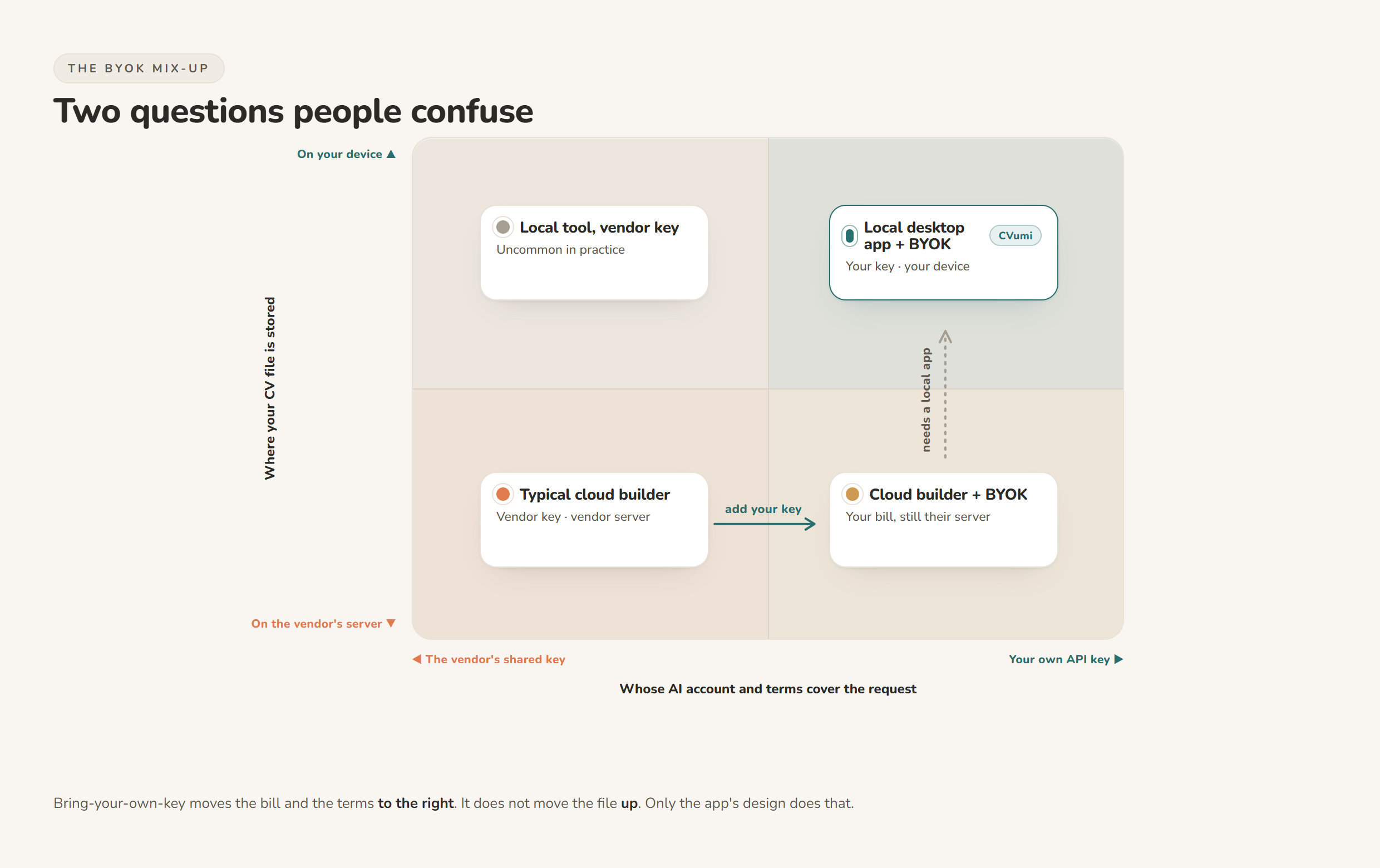
One more honest point. BYOK still sends your text to a provider. Running the AI under your own key is not the same as nothing leaving your computer. The request goes out, gets processed, and, as you will see, may be held for a short window even by providers that do not train on it. A local tool with BYOK keeps the file itself at home and sends only the request you asked for. That is a real improvement over uploading the whole document, but it is not the same as fully offline.
What a bring-your-own-API-key resume tool costs to run
This is the question the marketing rarely answers plainly, so here are real numbers.
Providers bill by the token. A token is a chunk of text, roughly four characters or about three quarters of a word in English (Anthropic pricing). A full application, meaning a tailored CV, a matching cover letter, a covering email and a fit analysis, is a few thousand tokens of input and a couple of thousand of output once you include your profile and the job description.
At current Anthropic rates, that is small. Claude Haiku 4.5 is 1 dollar per million input tokens and 5 dollars per million output tokens. Claude Sonnet 5 is 2 dollars in and 10 out through the end of August 2026, then 3 and 15 after that. Claude Opus 5, the strongest tier, is 5 dollars in and 25 out (Anthropic pricing). Run the arithmetic on a typical application of roughly 3,000 input and 1,800 output tokens and you land at about one cent on Haiku, under four cents on Sonnet, and around six cents on Opus, before any regenerating or back-and-forth edits. A search that runs to 50 tailored applications usually costs a dollar or two of API usage on a mid tier model, and less on the cheap one.
Two caveats keep this honest. Most providers ask for a small prepaid credit to start, often around 5 dollars, so that is your real entry cost rather than pure per-use billing. And every time you regenerate a section or chat back and forth to refine wording, you spend a few more tokens, so heavy editing adds up. Set a monthly cap with the provider and you cannot be surprised.
Compared with a subscription that bills every four weeks whether you apply or not, paying cents per application you actually send is usually the cheaper shape for a real job search. We laid out that comparison in full in one-time payment vs subscription resume builders.
Do the AI providers train on what you send?
Because BYOK sends your text to a provider, the provider's data policy is the one that counts. The good news is that the three big API providers all say, in writing, that they do not train their models on data sent through the API by default. The distinction that trips people up is that the API is not the same as the consumer chat product, and the free tier is not always the same as the paid one.
| Provider | Trains on API inputs by default? | The catch to check |
|---|---|---|
| Anthropic (Claude API) | No. "By default, we will not use your inputs or outputs from our commercial products... to train our models" ([Anthropic](https://privacy.claude.com/en/articles/7996868-is-my-data-used-for-model-training)) | Consumer Claude chat plans follow a different policy; the API route is the private one |
| OpenAI (API) | No. "Data sent to the OpenAI API is not used to train or improve OpenAI models" unless you opt in ([OpenAI](https://developers.openai.com/api/docs/guides/your-data)) | API logs are kept up to 30 days for abuse monitoring; a zero-retention option exists for eligible use |
| Google (Gemini API) | Paid tier: no. "Google doesn't use your prompts... or responses to improve our products" ([Google](https://ai.google.dev/gemini-api/terms)) | The free tier does use your content to improve Google products, so a paid key is the private one |
Read the table with one nuance in mind. "Not used for training" is not the same as "never stored anywhere". Even a provider that does not learn from your text may hold it briefly for safety and abuse monitoring, as OpenAI's 30 day default shows. That is a normal, short retention window, and it is very different from a builder keeping a permanent copy of your CV tied to your account. But it is why the fully private option is a tool that keeps the file local and sends only the request you ask for, under a paid API key with a no-training default.
The three kinds of bring-your-own-API-key resume tools
Not all BYOK resume tools sit in the same place on that chart above. There are three broad kinds, and they trade convenience against control differently.
The first is open-source software you run yourself. Projects like Reactive Resume, self-hosted with Docker, let you plug in a key from OpenAI, Google or Anthropic and keep the whole thing on hardware you control. Others in this group, such as ResumeLM and various command-line tailoring tools, work the same way. This is the most private and the most flexible option, and it asks the most of you. Someone has to install it, run it, and keep it updated. If you are comfortable with that, it is hard to beat.
The second is a cloud or web tool that offers BYOK as a setting. You paste your key so the AI runs on your account instead of theirs, which controls the cost and lets you choose the model. That is a genuine benefit. Just remember the earlier point: check where the CV itself is stored. In many of these tools the file still lives on the vendor's server, so BYOK is saving you money on the AI without moving your document off their systems.
The third is a local desktop app with BYOK. The app runs on your own computer, your files stay in a folder you choose, and when an AI step runs it calls the provider directly under your key. You get both properties at once: the file stays home, and the request runs on your terms. The trade is that you manage your own files and your own key rather than having everything synced and bundled for you.
| Kind of tool | Where your CV file lives | Who you pay for the AI | Setup effort | Best for |
|---|---|---|---|---|
| Open source, self-hosted | Your own server or machine | The provider, via your key | High: install, host, maintain | People comfortable running their own software |
| Cloud tool with a BYOK option | Usually the vendor's servers | The provider, via your key | Low | Cost control and model choice, if you accept cloud storage |
| Local desktop app with BYOK | A folder on your own device | The provider, via your key | Low to medium | Keeping the file private without self-hosting |
If you are weighing several of these against each other, the wider field is covered in the best privacy-friendly AI CV builders in 2026.
How to set up a BYOK tool safely
The setup is short, and getting one step right protects you from an easy mistake.
- Open an account with a model provider and add a small amount of credit. Anthropic, OpenAI and Google all work for most BYOK resume tools; pick one whose paid API has a no-training default, per the table above.
- Set a monthly spending limit in the provider's billing settings before you generate a key. This caps your risk if you regenerate a lot or if a key ever leaks.
- Generate an API key and copy it once. Providers show it in full only at creation, so paste it straight into the tool.
- Treat the key like a password. Do not share it, do not post it in a screenshot, and do not paste it into a chat or a public repository. Anyone with your key can spend on your account.
- Revoke and rotate if you ever suspect the key is exposed, or when you stop using the tool. Deleting a key takes seconds and instantly cuts off any request made with it.
Keeping the key private is the whole security model of BYOK, so it is the one step worth slowing down for. Everything else is paste and go.
How CVumi does it: a local app with your own key
CVumi is the third kind of tool. It is a desktop app for Windows and macOS, and it uses bring-your-own-key with Anthropic. Your CV, your master profile and your past applications stay in a folder you pick on your own computer. There is no CVumi server holding your documents, and the company never sees them. When an AI step runs, the request goes straight from your machine to your chosen AI provider under your own API key, so you pay Anthropic directly for usage, usually a few cents per application, and nothing is parked on a CVumi server in between.
From there it writes a tailored CV, a matching cover letter and a covering email together. Its fit analysis shows where you genuinely match a role and where the real gaps are, working only from your actual experience. It does not invent achievements to fill a blank. You can highlight any section and ask it to refine that part alone, leaving the rest untouched, and it handles several formats including the German Lebenslauf.
When the application is ready, one click opens your normal email client with the CV and cover letter already attached, so you review and send it yourself. Nothing is sent on your behalf. On cost, the app itself is a one-time payment: 69 EUR for a standard licence with three device activations, or 34 EUR with a student email, with no subscription and no per-application credit. The only ongoing cost is the few cents of Anthropic usage per application, billed to you by Anthropic, which you control.
One honest limit, the same one every tool here shares. Bring-your-own-key protects your billing and, in a local app, your file. It does not guarantee an interview or a job. It tailors and sharpens what is already true about you, and the rest is still your search to run. For the wider habit of keeping your whole application off other people's servers, see how to keep your career documents fully private and how to tailor a CV to a job description without uploading it to the cloud.
The short version
A bring-your-own-API-key resume tool asks you to supply a model provider's key instead of paying a bundled subscription. That gives you the true cost of the AI, usually cents per application, plus your choice of model and your provider's terms on every request. What it does not do by itself is decide where your CV is stored, so a web app can be BYOK and still keep your file on its servers. Read both questions separately: whose key runs the AI, and where the document lives.
If you want both answers to land in your favour, pick a tool that keeps the file on your machine and runs the AI under your own key. That is exactly how CVumi is built. Download CVumi. One payment for the app, your documents stay local, and you keep the key.