CV keywords from job description
How to Find the Right CV Keywords in a Job Posting
Most CV keyword advice tells you to game a robot. Here is how to read a job posting for the terms that actually matter, and mirror only the ones that are true of you.
Recruiters do not sit and read every CV word for word. They search, filter and skim, and the software they use ranks applications by how closely the wording lines up with the role. That is why "CV keywords from job description" is worth getting right. It is not about tricking a machine. It is about using the employer's own words for the skills and experience you genuinely have, so the right person finds you quickly.
The honest version of keyword work has two halves. Find the real terms in the posting, then mirror only the ones that are true of you. Get either half wrong and you either get missed or get caught.
The myth, and what actually happens
You have probably read that a large share of CVs, often quoted as 75%, are auto-rejected by software before any human sees them. That figure does not hold up. Career researchers have traced it to a resume-software vendor, Preptel, that promoted the number around 2012 and shut down in 2013 without ever publishing how it was measured.
What an applicant tracking system (ATS) really does is parse your CV into fields, store it, and rank it against the role and the recruiter's filters. It rarely deletes you outright. The one genuine automatic rejection is a "knockout" question the recruiter sets, such as work authorisation, a required licence, or a location you cannot meet.
So keywords are not a magic gate. They are a ranking and skim signal, and that signal is strong. In their 2021 report Hidden Workers: Untapped Talent, Harvard Business School and Accenture found that 88% of employers agreed qualified candidates get filtered out of the process because their applications do not match the exact criteria in the job description. Lead researcher Joseph Fuller gave blunt examples, including hospitals scanning nurse CVs for "computer programming" when what they actually needed was data entry. The lesson is not to game the filter. It is that the employer's exact words carry weight, so use theirs when they describe something you have really done. If your CV keeps getting passed over despite real experience, wording is one of the first things to check, as we cover in why my CV keeps getting rejected.
What counts as a keyword
A keyword is any term the employer uses to describe what the job needs: a hard skill (Python, SQL, financial modelling), a tool or platform (Salesforce, Figma, SAP), a certification or licence (PMP, CPA, forklift licence), a job title, a method or framework (Agile, GAAP, ISO 9001), or a domain term (B2B SaaS, clinical trials, accounts payable). Soft skills appear too, but "stakeholder management" pulls more weight than "team player".
Two details matter. Write both forms of any term, the spelled-out phrase and the acronym, because a filter or a reader may look for either: "search engine optimisation (SEO)". And match the employer's spelling and phrasing rather than your preferred synonym. If the posting says "client onboarding", do not assume "customer setup" will carry it.
How to pull the real keywords from a posting
Read the requirements, skip the boilerplate
The "requirements" or "qualifications" block holds the hard filters. The "responsibilities" block tells you the verbs, tools and outcomes the role runs on. Benefits, culture statements and equal-opportunity text are boilerplate. There is nothing to mirror there.
Let repetition set the priority
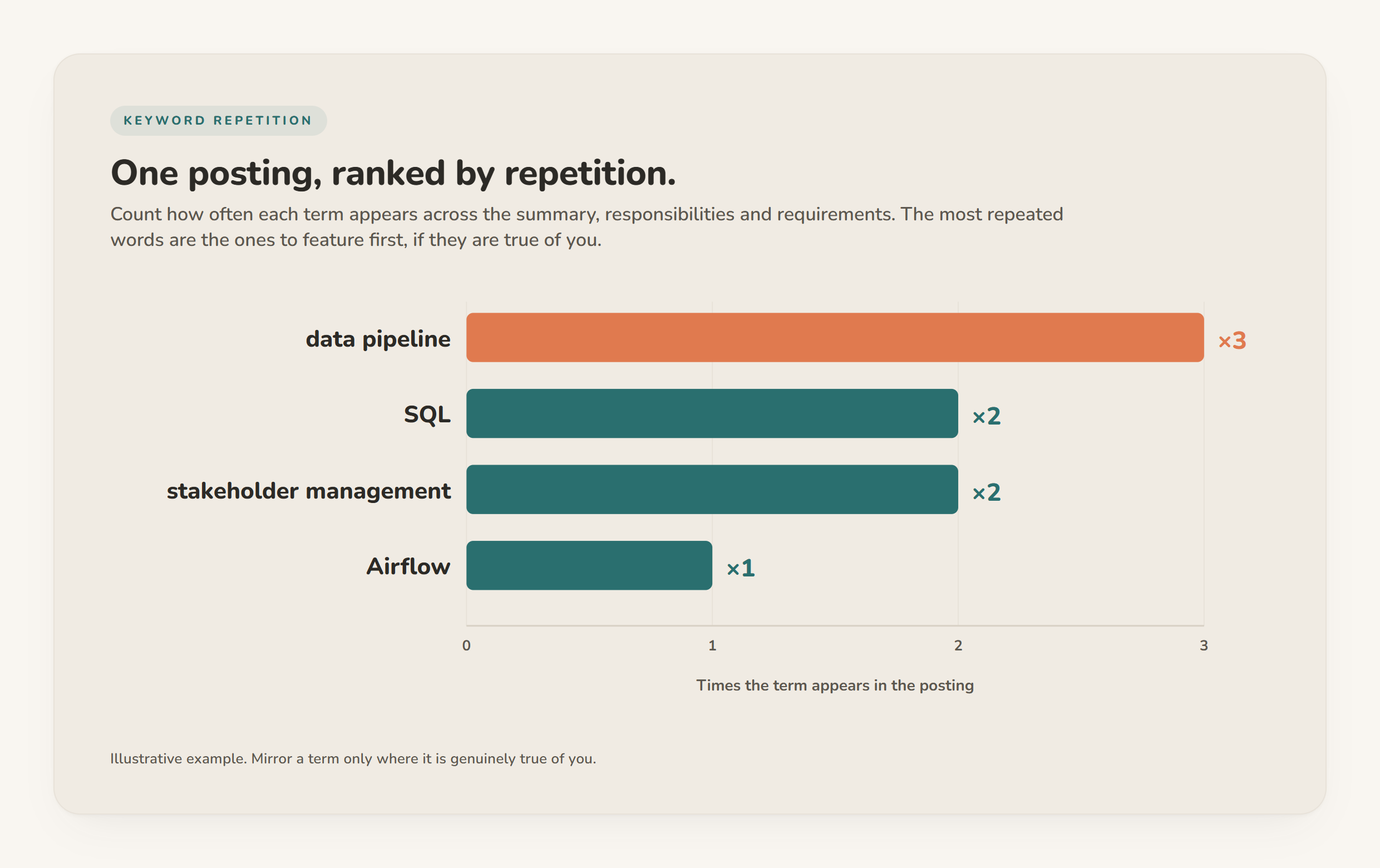
A term that appears in the summary, the responsibilities and the requirements is one the employer cares about most. Repetition is a free ranking of what to feature. If "data pipeline" shows up three times, it belongs near the top of your CV, assuming you have built one.
Separate must-haves from nice-to-haves
Words like "required", "must have" and "minimum" mark the non-negotiables. "Preferred", "bonus" and "nice to have" mark the softer set. Cover the must-haves you genuinely meet first, and treat the rest as upside.
The rule that keeps you honest: mirror only what is true
Every keyword you lift from the posting gets one test before it lands on your CV. Is it true of you? If you have done the thing, use the employer's word for it. If you have not, leave it off. Claiming a tool you have never touched or a certification you do not hold is the quickest way to fail a screening call or an interview task, and it is the line between tailoring and lying.
This is where a fit analysis earns its place. Instead of eyeballing the posting and hoping, you compare the full list of requirements against your real history and see, item by item, what matches and what is a genuine gap. Gaps are useful information. Sometimes you can close one with a phrase you simply forgot to include, and sometimes the honest answer is that the role is a stretch this time. Either way you are working from facts rather than wishful thinking.
Keyword types and how to handle each
| Keyword type | Example in a posting | How to mirror it | Verify against |
|---|---|---|---|
| Hard skill / tool | "experience with SQL and Airflow" | Name it in your skills list and show it in a bullet with a result | A project where you actually used it |
| Certification / licence | "PMP certification required" | State it exactly, with the acronym | The credential you actually hold |
| Job title | "Financial Analyst" | Echo the title where your past role matches | Your real title or a fair equivalent |
| Method / framework | "Agile delivery", "GAAP reporting" | Use the exact term in context | Work you ran under that method |
| Domain term | "B2B SaaS", "accounts payable" | Reflect the sector language in your summary | Your actual industry experience |
| Soft skill | "stakeholder management" | Show it through a specific example, not a label | A real situation you can describe |
Placing keywords without stuffing
Density is not the goal. Context is. A skills section carries the exact terms cleanly, which matters because recruiters tend to filter on skills first. Jobscan's State of the Job Search survey found skills are the most common first filter recruiters apply, at roughly 76%. Your experience bullets then prove those skills in context, tied to a number or an outcome. The summary can hold two or three of the highest-priority terms in a real sentence.
What fails is the keyword dump: a wall of comma-separated terms, hidden white text, or the same phrase forced into every line. A human reads straight past it, and it makes even true claims look padded. Nearly every large employer runs an ATS now (Jobscan's analysis detected one at 97.8% of Fortune 500 companies in 2025), so the wording has to satisfy both the filter and the person reading after it. For a fuller walk-through of matching a role without tipping into stuffing, see customise your CV for ATS without keyword stuffing.
Do it once, honestly, for each role
Finding the right CV keywords is reading comprehension plus honesty. Pull the terms the employer actually uses, rank them by how often they appear and whether they are required, and put on your CV only the ones you can stand behind in an interview. And because a job posting and your history are personal data you are matching against each other, there is no need to paste either into a third-party website to do the work. Our note on how to tailor a CV to a job without uploading to the cloud explains why that matters.
Try CVumi on your next posting
Paste the job description into CVumi and its fit analysis reads it against your real master profile, shows which of its keywords you genuinely match, and flags the real gaps. It never invents an achievement to fill one, so what you send is defensible line by line. Everything stays in a folder on your own machine until you choose to send it. From there you can reword any section in your own words in English, German, French, Spanish, Polish, Italian or Portuguese, and one click opens your email client with the CV and cover letter attached for you to review and send. It is a one-time licence, no subscription and no per-application charge. Download CVumi for Windows or macOS and tailor your next application from the posting up.