tailor CV to job description privately
How to tailor a CV to a job description without uploading it to the cloud
Match your CV to a specific job without handing your history to an online builder. A step-by-step method you run locally, plus how CVumi keeps it private.
Most CVs are rejected for a plain reason. They do not clearly match what the job asks for. Tailoring fixes that, and it works. The catch is that the usual way to tailor, an online builder or a job-board tool, asks you to hand over the one document that lists your name, your address, your employers and your dates. Once that file sits on someone else's server, you have less say over where it goes next.
You do not have to make that trade. This guide shows how to tailor a CV to a job description privately, on a computer you control, and still hit the marks that get you read. The method works in any text editor. At the end I show how CVumi does the same steps locally, if you would rather have them handled for you.
What actually happens when you upload your CV
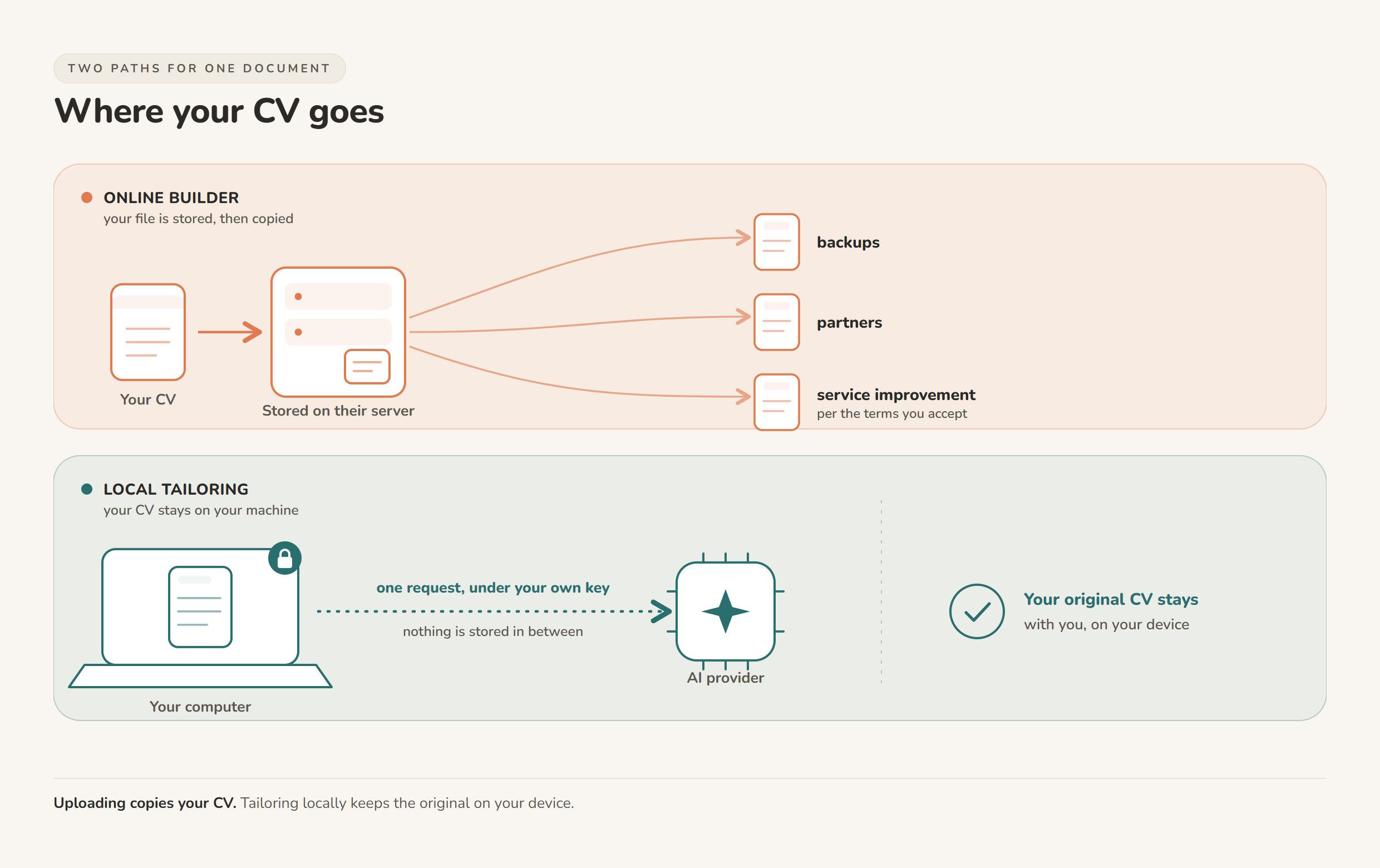
Online builders and job boards keep a copy of what you give them. That is the product, not a side effect. Your file is stored, backed up, and in many cases used to improve the service or shown to partners, depending on the terms you agree to when you sign up.
In the EU there is a real safety net. The right to erasure, GDPR Article 17, lets you ask a company to delete your personal data, and it is worth using. It also has limits that are easy to miss. A deletion request reaches the copies a company controls, but backups and data already shared can linger, and the law lists several cases where the right does not apply at all. Asking for deletion after the fact is weaker than never sending the file. The safest copy of your CV is the one that stays on your machine.
Online builder vs. tailoring on your own machine
Both routes can produce a well-matched CV. They differ in who ends up holding your data.
| Online CV builder or job board | Tailoring on your own computer | |
|---|---|---|
| Where the file is stored | On the provider's servers | In a folder you choose on your device |
| Who can read it | The provider, plus any processor or partner in their terms | You, and only what you choose to send |
| Reused for other purposes | Often, per the terms you accept | No, unless you send it somewhere |
| Works without a connection | Rarely | Editing does; AI steps need a connection |
| Deleting your data | A request the provider must honour, though copies can persist | Delete the file yourself |
| Typical cost | Monthly subscription | One-time or free tools |
Tailoring locally has one honest tradeoff. You manage your own files, and if you use an AI step you bring your own connection and key. For most people that is a small price for keeping the original where it belongs.
How to tailor a CV to a job description privately, step by step
Here is a method you can run in about 20 to 30 minutes per role, start to finish, on your own computer. You need your current CV, the job posting, and a text editor.
- Read the posting twice. First for the role, then for the words. Note the responsibilities and the required skills, and copy the exact phrases the employer uses. If the ad says "stakeholder reporting", write "stakeholder reporting", not "keeping people in the loop".
- Map each requirement to real evidence. Make two columns. On the left, every requirement from the ad. On the right, one thing you have actually done that matches it. Where you have no honest match, leave the line blank. That blank is information. It shows where to be modest now, and what a short course or side project could fix before the next application.
- Rewrite the top third. Reviewers spend seconds on the first screen. Put your matched points there. Redo your summary and your most recent role so the opening lines answer the ad, and keep the rest of your history accurate and complete.
- Use numbers you can defend. "Improved performance" says little. "Cut report preparation from three days to one" says a lot, and you can back it up when someone asks. Only use figures you can explain. A number you cannot defend is worse than no number.
- Match their language, honestly. Software and busy humans both scan for the words in the ad. Duke University's career team puts it plainly: read the posting for its key terms and work them into your accomplishment statements (Duke Career Hub). Use the exact terms where they are true for you. Do not paste the whole ad in white text at the bottom of the page. That trick is old and it fails the moment a person opens the file.
- Keep one master, tailor copies. Keep a full, honest master CV in your local folder. For each job, save a copy and trim it to the role. You are choosing which true things to feature, not inventing new ones.
Where keywords fit, and where stuffing backfires
Screening software is common, which is why the words matter. In Jobscan's 2025 report, 97.8% of Fortune 500 companies used a detectable applicant tracking system (Jobscan, 2025 ATS Usage Report). That is a reason to use the employer's own terms. It is not a reason to game the parser.
The "aim for an 80% keyword match" advice built into many resume tools is a rough guide, not a rule. A CV that scores well but reads like it was assembled by a machine still loses at the human step. Write for the person who reads it second, and let the honest keyword matches take care of the software. For the full method on this, see how to customise a CV for ATS without keyword stuffing.
How CVumi tailors your CV locally
CVumi is a desktop app for Windows and macOS. Your CV, your master profile and your past applications live in a folder you pick on your own computer. CVumi runs no server that stores your documents, and the company never sees them.
When you tailor a role, the app reads the job description and your history on your machine. If an AI step runs, the request goes straight from your computer to the AI provider under your own API key, not through a CVumi server that keeps a copy. You decide what, if anything, leaves the device.
From there it writes a tailored CV, a matching cover letter and a covering email together. Its fit analysis shows where you genuinely match the role and where the real gaps are, using only your actual experience. It does not invent achievements to fill a blank.
One honest point about the word "cloud". Tailoring locally does not mean nothing ever touches a network. An AI step still sends a request when you ask for one. The difference is control. Your document is not parked on a builder's server to be stored and reused; it stays with you, and any request runs under your own key. If you want to go deeper on this, read how to keep your career documents fully private.
When the application is ready, one click opens your normal email client with the CV and cover letter already attached, so you review and send it yourself.
CVumi is a one-time payment: 69 EUR for the standard licence with three device activations, or 34 EUR with a student email. There is no subscription and no per-application credit. If you are weighing that against a monthly tool, see one-time payment vs subscription resume builders.
A pre-send checklist
- The first screen answers the ad.
- Every claim is true and something you can defend in an interview.
- The exact phrases from the posting appear where they honestly fit.
- Numbers are specific and explainable.
- Your master CV stays in your local folder; you sent a copy, not its home.
- The file exports cleanly to PDF.
Once you have the method, tailoring takes about 20 to 30 minutes a role. That is slower than firing the same CV at every posting, and far more likely to get a reply, without leaving your history on a server you do not control.
If you would rather have these steps handled on your own machine, download CVumi. One payment, your files stay local, and you keep the key.