CV builder without an account
CV builders that work without an account
Most CV builders let you type freely and then ask for an account the moment you click download. Here are the tools that never ask, and a two-minute test for the ones that do.
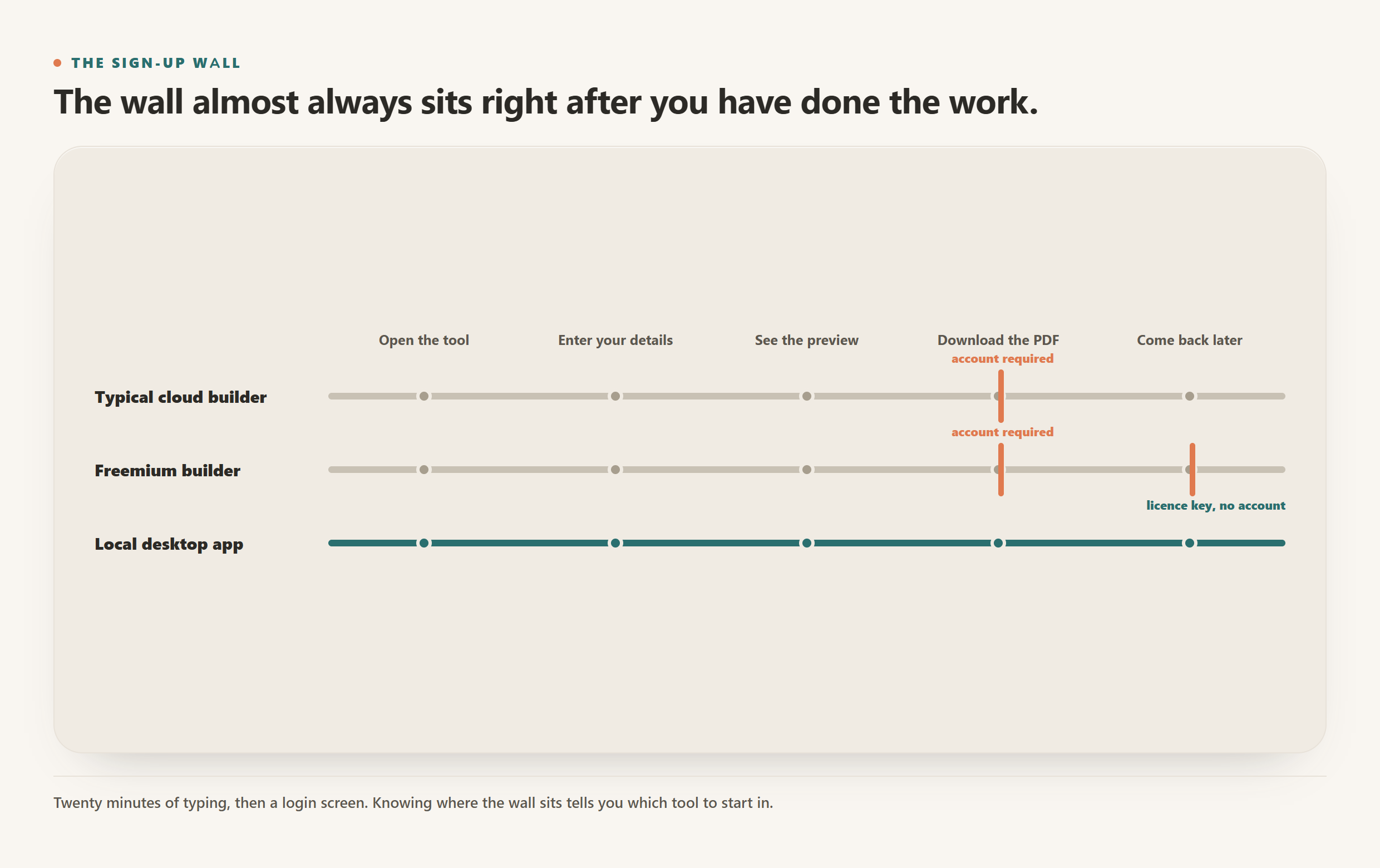
You want to write a CV, not open a relationship with a company. Yet most CV builders let you type happily for twenty minutes and then put a wall in front of the download button: create an account to export your PDF.
That wall is not a technical necessity. Formatting text into an A4 document requires no login. The account exists for other reasons, and once you can name them you can choose tools on purpose rather than by accident.
Why the sign-up wall exists
There are three honest reasons and one that is less honest.
Your email is the product's growth engine. An email address means onboarding sequences, discount reminders and win-back campaigns. A CV builder with no email list has no cheap way to reach you again.
Subscription mechanics need identity. If the business model is monthly billing, it needs an account to attach the subscription to.
Saving your work needs somewhere to save it. This one is genuine. If the tool stores your documents on its servers so you can come back next week, it needs to know which documents are yours.
And the one that is rarely stated: your CV is valuable data. A completed CV is a verified, structured record of a real person's employment history, contact details and job-search intent. That is worth more to an advertiser or a recruitment marketplace than the few euros you would have paid for the software.
Notice that only the third reason is about serving you, and it only applies because the tool chose to store your file in the first place.
Tools that genuinely need no account
These are the ones where you can go from blank page to a finished PDF without giving anyone an email address.
| Tool | Account to use | Account to download | Where the file lives | Cost |
|---|---|---|---|---|
| CVumi (desktop app) | No | No | A folder on your own computer | One-time licence, 69 EUR (34 EUR student) |
| OpenResume (browser) | No | No | In your browser, on your device | Free, open source |
| LaTeX or a word processor | No | No | Your computer | Free to cheap |
| Reactive Resume (self-hosted) | Yes, on your own instance | Yes, on your own instance | Your own server | Free, open source |
| Typical cloud builder | Sometimes not | Almost always yes | The provider's servers | Usually a monthly subscription |
A note on the self-hosted option. Reactive Resume does require an account, but it is an account on a server you run, holding data you already control. That is a different thing from an account on a stranger's platform, even though the login screen looks the same.
The desktop route
A desktop app sidesteps the question entirely. There is no server to have an account on. CVumi runs on Windows and macOS, keeps your master profile and every generated document in a folder you pick, and asks for an email address exactly once: at purchase, so the payment provider can send your licence key. Nothing you write is ever sent to a CVumi server, because there is no CVumi server holding documents.
The licence key is not an account. It unlocks the software on up to three devices and involves no password, no profile and no login screen.
The browser-local route
OpenResume is worth knowing about. It runs in your browser tab, keeps your data in local storage on your machine, and exports a PDF without asking who you are. It is free and open source. It does less than a full AI tool, mostly manual editing plus ATS-oriented checks, but for a straightforward CV with no sign-up it does the job.
How to test any tool in two minutes
Before you invest an hour writing, run this check. It costs less than discovering the wall later.
- Start filling it in and look for the download button. If it is greyed out or absent before you sign in, that is your answer.
- Read the pricing page for the word "free". Free to build and paid to download is a normal pattern. It is not dishonest, but it is not free either.
- Open the privacy policy and search for "partners" and "third parties". Two minutes of skimming tells you whether your details stay put.
- Check whether deleting your account deletes your documents. These are often different actions with different timelines.
- Ask what happens offline. If the tool stops working without a connection, your CV is not on your machine.
Account-free is not automatically private
This is the trap worth naming. A tool can require no account and still send everything you type to a server for processing. No account simply means no persistent identity attached to the data. It does not mean the data stayed with you.
The two questions are separate, and you want both answers to be good:
- Do I need an account? This is about lock-in, marketing and whether you can leave cleanly.
- Where does the file actually go? This is about privacy.
A browser tool with no login that posts your CV to an API for rewriting has answered the first question well and the second one badly. Ask both.
What to do
If you want the shortest path: use a tool that runs on your machine. No account exists because no server exists, and the privacy question answers itself.
If you want free and simple, OpenResume in the browser will get you a clean PDF with no sign-up at all.
If you are already deep into a cloud builder and hit the wall, it is worth checking whether the export is genuinely gated or just nagging. Some tools let you print to PDF from the preview.
For the fuller picture on what happens to your file once it leaves your machine, see how to keep your career documents fully private and the best privacy-friendly AI CV builders in 2026.